🏪Marketplace
The Marketplace replaces street vending on Classic Reimagined. Instead of sitting in town with a shop open, you list your items once and they stay up for sale even while you are offline. Buyers can browse every listing on the server from one window, from anywhere.
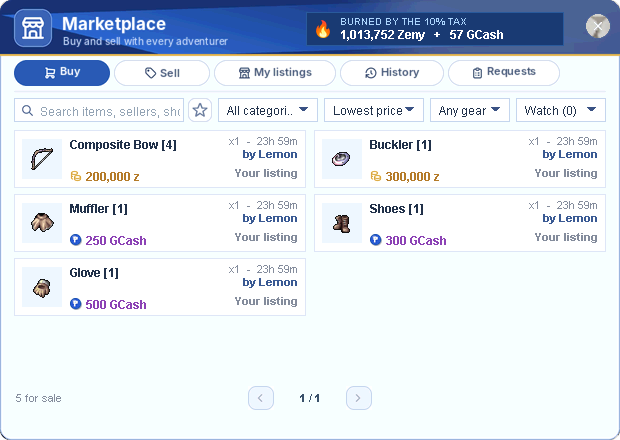
Every item is priced in Zeny or in GCash: you choose the currency for each item you sell. The price shows the coin it is in, gold for Zeny and purple for GCash.
ℹ️How to open it: press the Marketplace button on the menu bar. It opens the Marketplace window anywhere: no Vending skill, no Pushcart stall, no chat room, no need to stay online. Every class can use it.
🏪Check prices before you log in: the Marketplace page on the website shows everything on sale right now, recent sales, the most sold items and open buy requests.
Quick Facts
| Listings | Up to 12 items per character at the same time |
| Listing time | 24 hours, 48 hours, 7 days, 14 days or 28 days |
| Currencies | Zeny (up to 1,000,000,000) or GCash (up to 1,000,000; your account wallet, 1 GCash = 1 PHP) |
| Sales tax | 10% of each sale, taken from the seller's payment |
| Listing fee | 2% of the listed value per day (min 5,000, max 36,000 Zeny per day) |
| Getting paid | Zeny by RoDEX mail, GCash straight into your account wallet, even while you are offline |
| Buy requests | Up to 5 per character, no fee |
| Watchlist | Up to 10 searches; you are told when a match is listed |
The Window
| Tab | What you do there |
|---|---|
| 🛒 Buy | Browse and buy everything listed on the server. |
| 🏷️ Sell | Pick items from your inventory, set prices and open your shop. |
| 🏬 My listings | See what you are selling: change prices, add time or take items back. |
| 🕘 History | Your last 10 sales and purchases, with the tax paid. |
| 📋 Requests | Post buy requests, or sell your items to other players' requests. |
Buying
- Search by item name, seller name or shop title, and pick a category: All categories, Equipment, Items, Cards or Costume.
- Sort by Lowest price, Highest price, Newest or Ending soon, and filter gear with Any gear, +4 and up, +7 and up, +9 and up or With cards.
- Each listing shows the item, how many, the time left, the seller, and the price in Zeny (z) or GCash. Your own items say Your listing.
- Open a seller's whole shop to see everything they are selling.
- Check the market price of an item: the lowest price right now, the average price, and the last sale.
- Pay with Zeny or GCash, depending on how the item is priced. GCash comes straight out of your account wallet. You can buy part of a stack.
- The item goes straight to your inventory. If your bag is full, it is sent to you by RoDEX mail.
- Pay attention to the currency before you buy: 200,000 z is Zeny, 250 GCash comes out of your wallet.
Selling
- Open the Sell tab and add up to 12 items from your inventory.
- Set a price for each item, in Zeny or GCash. GCash sales go straight to your account wallet (no mail).
- Choose how long they stay listed: 24h, 48h, 7d, 14d or 28d, and give your shop a title.
- Press Open shop and pay the listing fee. Your items leave your inventory and are now for sale.
- When an item sells, you receive the price minus 10% tax: Zeny by RoDEX mail, GCash straight into your account wallet. If you were offline, you get a summary of your sales the next time you log in.
- Items that don't sell come back to you by RoDEX mail when the listing ends.
- In My listings you can change the price for free, add more time (same fee as a new listing), or take an item back (the fee is not returned).
- Proof of Donation is now GCash: any PoD you still had became GCash in your wallet (1 PoD = 1 GCash).
⚠️Keep room in your mailbox. Payments and items are delivered by RoDEX mail, so nobody can buy from you while your mailbox is full (30 mails). Claim or delete old mails regularly.
Buy Requests
Looking for something nobody is selling? Post a request and let sellers come to you.
- Post a request: choose the item, how many you want, the price per item (Zeny or GCash) and how long the request stays up. The full price is held when you post; posting is free.
- Sell to a request: open the Requests tab, find a request for an item you have, and sell to it. You receive the price minus 10% tax, and the buyer gets the items by RoDEX mail.
- Cancel a request at any time, or let it expire, and the held money comes back to you.
- You can have up to 5 requests at the same time.
Watchlist & Announcements
- Type a search and press the ★ to add it to your watchlist (up to 10, shown as Watch (n)). When someone lists a matching item, you are told right away, or the next time you log in.
- New sales, purchases and buy requests scroll across everyone's screen, so the whole server can see what is on the market.
🔥 Burned by the Tax
The top of the window shows how much Zeny and GCash the 10% tax has taken out of the game for good. Every sale pays tax, and that Zeny and GCash is destroyed, not given to anyone. It keeps prices healthy. Point at it to see the total for all time, the last 7 days or the last 24 hours.
Fees & Tax
| What | Cost |
|---|---|
| Selling (listing or buy request) | 10% of the sale, paid by the seller |
| Listing fee | 2% of the listed value per day, at least 5,000 and at most 36,000 Zeny per day, always paid in Zeny. GCash prices count at what GCash costs in Zeny on the website's Zeny Market (30-day average). |
| Changing a price | Free |
| Adding time | Same as a new listing for that time |
| Posting a buy request | Free (the price is held until it is filled, cancelled or expires) |
| Buying | Only the listed price, no tax for the buyer |
See Trading Tax for the full fee table, examples and how GCash listings are valued.
Tips
- Check the market price before you list, so your item sells quickly at a fair price.
- Short listings cost less. List for 24-48 hours first, then add time only if needed.
- Use buy requests for materials you need in bulk; sellers fill them while you play.
- Keep an eye on your mailbox: every payment arrives there.